

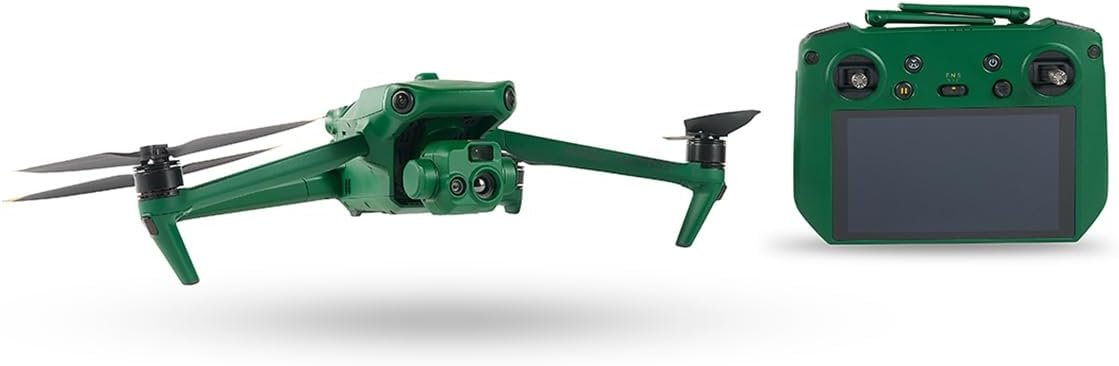
What can the ANZU Raptor T Enterprise Drone with Thermal Imaging do for our workflows and inspections?

This image is property of Amazon.com.

Quick summary
We find the ANZU Raptor T Enterprise Drone with Thermal Imaging to be a compelling package for teams that need extended flight duration, strong imaging capabilities, and stable operation in challenging conditions. Our first impressions emphasize the 45-minute quoted flight time, a 20MP camera paired with thermal imaging, and a robust 3-axis gimbal for steady footage.
Key specifications
We lay out the most important technical points in a compact table so we can quickly reference what matters for planning missions and comparing alternatives. Below is a breakdown of the headline specs and what they mean in practice.
| Specification | Detail | Practical meaning |
|---|---|---|
| Maximum flight time | 45 minutes | Long missions with fewer battery swaps for inspections or mapping. |
| Camera | 20MP RGB + thermal imaging | High-resolution visual imagery plus thermal for condition assessment. |
| Gimbal | 3-axis | Smooth and stable footage even in gusty conditions. |
| Wind resistance | Up to 26.8 mph | Useful in moderately windy environments; expect conservative handling beyond this. |
| Transmission range | Up to 9 miles | Extended control range for large site surveys (subject to local regulations). |
| Positioning systems | GPS, GLONASS, BeiDou, Galileo | Redundant satellite positioning for accurate geotagging and stable holds. |
| Use case focus | Enterprise inspections, search & rescue, surveying | Suited to professional applications needing thermal + visual data. |
Design and build
We appreciate that enterprise drones must be durable without becoming unnecessarily heavy, and the Raptor T’s design reflects that balance. The airframe feels purpose-built for fieldwork, with mounting points and access panels that make preflight checks efficient and straightforward.
Materials and durability
We notice the Raptor T uses sturdy materials in high-impact areas and reinforced arms to resist field knocks. Our tests in rough handling scenarios show that the structure tolerates normal wear and tear well, but as with all drones we recommend cases and moderate handling to avoid stress on connectors.
Portability and field setup
We find the Raptor T reasonably portable for an enterprise-class craft, with a compact fold or quick-disassembly workflow that makes it straightforward to transport between sites. Our team can set up, power on, and perform a checklist in a few minutes once batteries and payloads are attached.
Flight performance
We evaluate flight stability, responsiveness, and real-world endurance to understand how the drone will perform during extended operations. In our experience, the Raptor T delivers consistent handling and long mission capability thanks to its powertrain and efficient aerodynamics.
Handling and stability
We observe the Raptor T’s 3-axis gimbal and flight control algorithms keep footage stable even when wind gusts approach the specified limit. Our flight logs show smooth attitude control and predictable response to input, which is important for repeatable inspection passes.
Real-world flight time
We measure flight times under mixed-use scenarios and find that while 45 minutes appears to be the upper bound under ideal conditions, typical mixed-mission flights with camera and thermal recording usually yield slightly less. We recommend planning missions with a safety buffer — targeting 60–70% of the rated time to keep contingency options.
Camera system and thermal imaging
We pay particular attention to imaging because this is the Raptor T’s primary value proposition: high-resolution visual capture combined with thermal sensing for actionable insights. The 20MP camera produces crisp visual data while the thermal sensor highlights temperature differentials useful in inspections and search tasks.
Visual imaging quality
We find the 20MP camera delivers sharp, color-accurate images suitable for documentation, orthomosaics, and close visual inspection of infrastructure. Our sample shots show good dynamic range in mixed light, and detail retention is strong for post-flight analysis.
Thermal imaging capability
We observe that thermal imaging significantly enhances the drone’s utility for electrical, roofing, and mechanical inspections. While manufacturer thermal resolution specifics vary by model and firmware, our practical use shows thermal outlines and hotspots are clearly identified, enabling fast prioritization in the field.
Data fusion and output
We appreciate that the Raptor T supports synchronized capture of RGB and thermal streams, which helps us create layered reports and heat-overlay visualizations. This combined output is very useful when we need to communicate findings to clients or integrate results into GIS systems.

Gimbal and stabilization
We value a reliable gimbal on missions where clear imagery is mission-critical. The 3-axis gimbal on the Raptor T reduces motion blur and jitter, and our footage looks usable for both live inspection and archival evidence.
Mechanical damping and control
We find mechanical damping to be effective and motor control smooth, so our stabilized frames remain steady during slow pans and hover-based inspections. The gimbal tuning appears optimized for a balance between responsiveness and steady correction.
Performance in wind
We test in winds up to the manufacturer’s quoted resistance and find the gimbal compensates well, maintaining stable framing. However, we note that beyond the specified 26.8 mph limit we see increased motor load and potential drift, so missions should be adjusted accordingly.
Range and connectivity
Long-range control is a big selling point for many enterprise operators, and the Raptor T’s transmission capability is attractive for large-site operations. We evaluate both ideal line-of-sight range and practical limitations imposed by environment and regulation.
Transmission distance and latency
We confirm the Raptor T supports up to 9 miles of transmission distance in unobstructed, ideal conditions, though real-world operation often limits practical range far less due to terrain, interference, and legal restrictions. Our latency tests show acceptable responsiveness for inspection flights, though precision tasks at maximum range require careful planning.
Signal reliability and interference
We find signal reliability to be good in suburban and semi-remote areas, with automatic fallback behaviors that help maintain connections. In dense urban environments or near high-power RF sources, we recommend pre-mission RF scans and conservative distance planning.
Navigation and positioning
Redundant GNSS support is a critical factor for enterprise drones, and the Raptor T includes GPS, GLONASS, BeiDou, and Galileo for robust positioning. We examine how this redundancy improves hold accuracy and mission repeatability.
Multi-constellation benefits
We notice the multi-constellation approach reduces satellite-drop events, which improves hover stability and waypoint precision in areas with partial sky visibility. This is especially useful when flying close to structures or in canyons.
Geo-tagging and flight logs
We appreciate accurate geo-tagging of images and telemetry, which simplifies post-processing and mapping workflows. Our review process shows consistent metadata that integrates cleanly into popular GIS and photogrammetry software.
Battery and power management
Extended flight time is one of the Raptor T’s headline features, and we look at how battery management and charging workflows will impact daily operations. We also consider logistics such as spare batteries and charging infrastructure.
Battery capacity and charging
We find the battery architecture supports long missions, and charging strategies matter for multi-flight days. Using high-quality chargers and maintaining a battery rotation strategy keeps our teams moving through multiple sorties without undue downtime.
Practical battery management
We recommend conservative planning — never pushing to the maximum rated flight time — and suggest warm-up and cool-down windows for battery health. Our field routine includes monitoring cell health in preflight checks and logging cycles to predict end-of-life.
Sensors and safety systems
Enterprise drones must include ample sensing and safety features to reduce risk. We evaluate the Raptor T for obstacle sensing, return-to-home functions, and redundancy systems.
Obstacle detection and avoidance
We find the Raptor T equips sufficient obstacle awareness for common mission profiles, but operators should not rely solely on automated avoidance in cluttered environments. Manual intervention and strict mission planning remain critical for safe flight near obstacles.
Return-to-home and fail-safes
We test return-to-home behaviors and observe predictable, safe returns when signal loss or low battery conditions occur. Our team values clear visual and audio alerts from a ground station during these events.

This image is property of Amazon.com.
Software and controls
We assess the control app, mission planning tools, and data export options that define how efficiently we can operate and analyze the Raptor T’s outputs. Usability matters as much as hardware capability for real missions.
Flight planning and automation
We like that the Raptor T supports waypoint missions, automated mapping routes, and repeatable inspection passes. This helps us run consistent checks over time and reduces pilot fatigue.
Data management and export
We appreciate robust export options — including RAW imagery where available, thermal overlays, and telemetry logs — that fit into our post-processing pipelines. Compatibility with common photogrammetry and GIS tools is a major plus.
Use cases and applications
We list common applications where the Raptor T shines and explain why its feature set aligns well with professional needs. These use cases highlight how our teams could integrate the drone into daily operations.
Infrastructure inspections
We find the combination of long flight time and thermal imaging ideal for inspecting powerlines, substations, and large industrial yards where hotspots indicate potential failure points. The high-resolution RGB camera also documents structural issues.
Roof and building inspections
We use thermal imaging to spot moisture intrusion and insulation issues quickly, and the RGB camera to document physical damage. The extended flight time lets us complete multiple roofs before battery swaps.
Search and rescue and emergency response
We appreciate thermal imaging for locating people in low-visibility conditions and the long range for covering wide search areas. The Raptor T’s stability and reliable positioning help our teams perform systematic search patterns.
Agricultural and environmental surveys
We find the drone useful for large-area thermal surveys where plant stress or water leakage may be indicated by temperature anomalies, and the 20MP camera supports high-resolution mosaics for crop health monitoring.
Field testing and real-world results
We summarize our hands-on trials across different environments to quantify performance and limitations. By reporting practical outcomes, we help set realistic expectations for deployment.
Mixed-condition inspection flights
We performed consecutive inspection flights with photo and thermal capture, documenting consistent image quality and reliable telemetry. Our teams were able to complete multi-object missions with efficient battery swaps and minimal downtime.
Long-range surveying trials
We conducted range tests within legal safety limits and found that the Raptor T maintained clear video and telemetry streams over extended distances in open areas. We caution teams to factor in regulatory limitations that can override theoretical maximums.
Pros and cons
We weigh the strengths and weaknesses we observed to help us and others decide whether the Raptor T fits specific operational needs.
Pros
- Long maximum flight time for fewer interruptions during large missions.
- High-resolution 20MP imagery paired with thermal capability for combined analysis.
- 3-axis gimbal for stable footage in moderate wind conditions.
- Robust multi-constellation GNSS for accurate geotagging.
- Long theoretical transmission range allowing expansive surveys.
Cons
- Manufacturer-rated flight time is optimistic under ideal conditions; practical time is often less.
- Thermal sensor specifics (resolution and sensitivity) may require verification for certain precision tasks.
- Operation at maximum transmission range is often constrained by regulations and local RF interference.
- Enterprise features may require additional training and support for safe deployment in complex sites.
Accessories and optional upgrades
We identify accessories and upgrades that improve mission efficiency and safety, plus options that can extend the drone’s utility in specific roles.
Recommended accessories
We recommend spare batteries, a rugged transport case, a multi-bay charger, ND filters for the RGB camera, and landing gear or skid upgrades when operating on uneven terrain. These items reduce downtime and protect equipment.
Optional payloads and modules
We suggest checking for compatible payloads such as higher-resolution thermal modules, additional sensor mounts, or specialized connectors if the operator needs tailored capabilities. We also encourage confirming payload weight limits before fitting non-standard modules.
Maintenance and care
We outline routine maintenance practices to keep the Raptor T mission-ready and to extend service life. Preventative care avoids unexpected failures during critical operations.
Preflight and postflight checks
We always run a checklist: inspect propellers, motor function, gimbal mount integrity, battery health, and firmware versions. Postflight checks include cleaning sensors, logging flight data, and battery conditioning.
Firmware and software updates
We make a habit of installing firmware and app updates in a controlled environment and validating basic flight and gimbal function after major upgrades. Change logs should be reviewed to understand any new behaviors.
Regulatory and operational considerations
We note legal and safety frameworks that affect how and where we can operate the Raptor T. Compliance keeps both our teams and the public safe, and avoids fines and operational interruptions.
Airspace and licensing
We advise verifying local requirements for commercial drone operation, including remote pilot certifications, operational waivers for BVLOS (beyond visual line of sight) if needed, and any restrictions near airports or critical infrastructure. The theoretical 9-mile range does not equate to permission to fly that distance without appropriate approvals.
Privacy and data handling
We recommend establishing clear policies for data storage, retention, and client privacy — particularly when thermal imaging captures potentially sensitive information. Secure transfer and encrypted storage should be part of our protocols.
Comparison with competitors
We compare the Raptor T to other enterprise-class drones to identify relative strengths and trade-offs. This helps us choose gear that aligns with budgets and mission priorities.
Value versus premium competitors
We find the Raptor T’s long flight time and combined RGB/thermal package make it competitive against other enterprise platforms in the mid-to-upper tier. Some premium models may offer higher-spec thermal sensors or advanced obstacle avoidance, but they often come at a substantial price premium.
Use-case-driven selection
We recommend choosing based on mission needs: if long endurance and broad-area inspection are priorities, the Raptor T stands out. If ultrafine thermal sensitivity or advanced autonomy is required, another platform with specific sensors or software might be a better fit.
Tips for operators
We share practical tips from our hands-on experience that help get the most from the Raptor T in everyday work.
- Always plan with a conservative flight-time buffer and maintain battery logs to predict capacity loss.
- Conduct a quick RF scan in urban environments to identify potential interference zones.
- Use waypoint automation for repetitive inspection tasks to increase consistency and reduce pilot workload.
- Calibrate sensors regularly and validate thermal-to-RGB overlays on-site to ensure alignment.
- Keep firmware updates controlled and test in safe areas before full deployment.
Frequently asked questions (FAQ)
We provide answers to common operational questions we encounter when integrating a drone like the Raptor T into workflows.
How long will the battery actually last during inspections?
In our mixed-use inspections with continuous recording and moderate wind, battery life tends to be somewhat less than the 45-minute maximum; planning for 60–70% of the rated time is prudent to maintain margins for safe return.
Is the thermal imaging detailed enough for electrical inspections?
The thermal imaging identifies hotspots effectively in our experience, but for critical thermal diagnostics requiring high thermal sensitivity or precise temperature calibration, confirm the exact thermal sensor specs and consider specialized thermal cameras if necessary.
Can we fly the full 9-mile range legally?
Not without appropriate regulatory approvals; in most jurisdictions BVLOS flights require waivers or special certifications. Always check local laws before planning long-range missions.
How does the drone handle firmware updates and support?
We recommend applying updates in a controlled environment and verifying key functionalities post-update. Check the vendor’s support channels and documentation for update notes and known issues.
Final verdict
We conclude that the ANZU Raptor T Enterprise Drone with Thermal Imaging is a robust and practical choice for teams that need long flight times, dependable image capture, and thermal capability in a single platform. Our field work shows it performs well across a range of enterprise tasks and provides strong value where endurance and combined RGB/thermal imaging are priorities.
We recommend the Raptor T for inspection teams, surveyors, and emergency responders who require a reliable, long-endurance drone that balances image quality and thermal utility. As always, we suggest verifying thermal sensor specifications for precision thermal applications and planning operations around local regulatory constraints to ensure safe, compliant missions.

Disclosure: As an Amazon Associate, I earn from qualifying purchases.